The Truth About the Nitro 5 15 2020: Pros, Cons, and Verdict
Featured product: Nitro 5 15 2020
Introduction
The Acer Nitro 5 15 (2020) arrived as one of the more visible entries in the affordable gaming-laptop segment. Marketed to gamers on a budget, students, and those who need a multipurpose 15-inch laptop, the Nitro 5 promises solid performance, practical upgradeability, and gaming-capable graphics at a price point substantially below premium competitors. This article examines what the Nitro 5 15 2020 actually delivers in day-to-day use: performance, display, thermals, build quality, battery life, and value. It also outlines common real-world use cases and what prospective buyers should prioritize when choosing a configuration.
Overview and Key Specifications
The 2020 Nitro 5 was offered in a number of configurations. Typical builds paired Intel or AMD processors with NVIDIA GTX or RTX graphics, and came with 15.6-inch Full HD IPS panels — commonly available in 60 Hz or 120–144 Hz refresh-rate options. Storage combinations often included NVMe SSDs plus a secondary 2.5-inch bay for HDD expansion. Memory was user-upgradeable, and the chassis design emphasized cooling and serviceability.
To set expectations: the Nitro 5 is an entry-to-mid-level gaming machine. It is designed to provide a satisfying 1080p gaming experience at medium to high settings in most titles, while also offering the flexibility of upgrades and a port selection suitable for peripherals, external displays, and wired networking.
Detailed Product Review and Analysis
Performance
Performance is the Nitro 5's strongest selling point relative to its price. In 2020, Acer shipped models with Intel 10th-gen CPUs or AMD Ryzen 4000-series APUs, and graphics options ranged from the GTX 1650 up to the RTX 2060 in higher-tier SKUs. For 1080p gaming, a configuration with a GTX 1650 will handle esports and less-demanding AAA titles at medium to high settings, while a GTX 1660 Ti or RTX 2060 brings comfortable high/ultra settings in many modern games.
CPU performance for productivity tasks depends on the chosen chip: Ryzen 7 or Intel i7 options provide strong multicore performance for video editing, streaming, or compiling, whereas i5/Ryzen 5 configurations target gaming-first buyers who also need respectable general-purpose speed. The Nitro 5's storage options — NVMe SSDs — improve system responsiveness, and the additional drive bay makes it convenient to add capacity for large game libraries or media projects.
Thermals and Noise
The Nitro 5 uses a dual-fan cooling system with heat pipes to move heat away from the CPU and GPU. Under typical gaming loads the cooling solution keeps temperatures within acceptable limits, but under prolonged heavy workloads users may notice rising core temperatures and increased fan noise. Thermal throttling can occur in sustained, maximum-stress scenarios (for example, long encoding jobs combined with gaming), especially in lower-cost configurations with less generous thermal tuning. Users who plan to push the machine should look for models with higher-power GPUs and consider undervolting or setting an aggressive fan profile to sustain performance.
Display
The standard 15.6-inch Full HD IPS panels are serviceable for gaming; they deliver good viewing angles and contrast for the class. The higher refresh-rate options (120–144 Hz) are a tangible benefit for competitive gamers, making motion feel smoother and reducing perceived input lag in fast-paced titles. Color accuracy and brightness are typical of mainstream gaming displays: fine for gaming and general media, but not as color-accurate or bright as dedicated creator-grade panels. For content creators who need reliable color reproduction, an external calibrated monitor is recommended.
Build Quality and Design
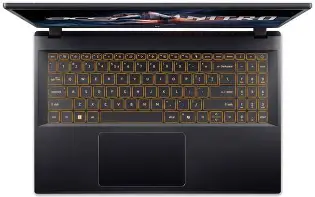
The Nitro 5's chassis is predominantly plastic with a matte finish and design accents aimed at gamers. The build feels solid for a budget laptop — hinges are sturdy, and the keyboard deck resists flex adequately under typing pressure. The aesthetic is functional rather than premium: expect practical durability instead of metal unibody refinement. One advantage of this design is serviceability: many Nitro 5 models offer easy access to RAM and storage slots, which supports user upgrades and repairs.
Discover deals on Electronics — updated daily.
View Offers →Keyboard, Trackpad, and Speakers
The keyboard on the Nitro 5 is comfortable for long gaming and typing sessions. Keys have a noticeable travel and a firm actuation. Many 2020 models include a red backlight or selectable zone RGB; the layout is generally sensible with full-sized arrow keys. The trackpad is average: precise enough for general use but not a replacement for a dedicated mouse during gaming.
Speakers are acceptable for casual media consumption, offering decent mids and highs but limited bass. For immersive audio while gaming or watching movies, an external headset or speakers yields a much better experience. The built-in microphone and webcam are basic and suitable for video calls, but not for content creation that expects studio-level clarity.
Battery Life
Battery capacity in the Nitro 5 15 2020 was adequate but modest relative to ultrabooks. Real-world battery life varies considerably: light productivity and web browsing can yield several hours of use, while gaming on battery reduces runtime dramatically (often under two hours). Buyers should treat the Nitro 5 as primarily a plugged-in gaming machine; expect to use the charger for extended gaming or performance-heavy tasks.
Ports and Expandability
A strong point for the Nitro 5 is its port selection. Typical configurations include multiple USB-A ports, a USB-C port (varies by model), HDMI output suitable for external displays, an Ethernet jack for wired multiplayer stability, and a media card reader on some SKUs. Internally, the ability to upgrade both RAM and storage is a major plus — users can start with a basic SSD and add more capacity or RAM later without replacing the entire machine.
Real-World Use Cases
- Esports and competitive gaming: A Nitro 5 equipped with a high-refresh display and a mid-tier GPU (GTX 1650 Ti or better) is an excellent cost-effective choice. It gives responsive frame rates for titles like Counter-Strike, Valorant, Rocket League, and Overwatch.
- Casual and AAA gaming: For open-world titles and modern AAA games, higher-tier Nitro 5 configurations with GTX 1660 Ti or RTX 2060 maintain enjoyable settings at 1080p. Players who insist on max settings may need to accept compromises or target RTX-capable SKUs.
- Student or hybrid work/gaming: Students who need a single laptop for lectures, note-taking, and gaming will appreciate the Nitro 5's balance of performance and price. The upgradeability also helps extend longevity as storage and memory needs grow.
- Light content creation: Video-editing and photo work are possible on higher-end Nitro 5 builds; the GPU assists in accelerated workflows. Pros working with color-critical content should consider external monitors or different machines.
- Travel and LAN parties: At roughly 2.2–2.5 kg, the Nitro 5 is portable enough for occasional travel but not ideal as a daily commuter if weight is the primary concern.
Pros & Cons
Pros
- Strong price-to-performance ratio for 1080p gaming.
- Wide range of configurations: choose between Intel or AMD CPUs and GTX/RTX GPUs.
- User-accessible internals for easy RAM and storage upgrades.
- Optional high-refresh displays (120–144 Hz) for competitive gaming.
- Solid port selection including Ethernet and HDMI for desktop-like setups.
- Durable, practical chassis with a gamer-focused aesthetic.
Cons
- Battery life is average; gaming requires mains power for sustained performance.
- Display color accuracy and brightness are adequate but not class-leading.
- Fans can become loud under heavy load, and thermal throttling is possible in extreme sustained workloads.
- Build materials are mostly plastic — acceptable but not premium.
- Speakers and webcam are functional but unimpressive for creators.
Comparison Table: Nitro 5 15 2020 vs. Typical Competitors
| Model | Typical CPU | Typical GPU | Display | RAM / Storage | Battery / Weight | Best for |
|---|---|---|---|---|---|---|
| Nitro 5 15 (2020) | Intel 10th-gen or AMD Ryzen 4000 | GTX 1650 / GTX 1660 Ti / RTX 2060 | 15.6" FHD IPS, 60–144 Hz | 8–32 GB; NVMe SSD + HDD bay | ~4–7 hours light use; ~2.2–2.5 kg | Budget to mid-range gaming, upgradeable |
| Lenovo Legion Y540 (typical 2020) | Intel 9th/10th-gen | GTX 1660 Ti / RTX 2060 | 15.6" FHD IPS, 60–144 Hz | 8–32 GB; NVMe SSD | Similar battery; ~2.3–2.4 kg | Balanced performance with cleaner design |
| Dell G5 15 (2020) | Intel 10th-gen | GTX 1650 / GTX 1660 Ti | 15.6" FHD IPS, 60–144 Hz | 8–32 GB; NVMe SSD + HDD | Comparable battery; ~2.5 kg | Value-oriented gaming with conservative styling |
| Asus TUF A15 (2020) | AMD Ryzen 4000 | GTX 1660 Ti / RTX 2060 | 15.6" FHD IPS, 60–144 Hz | 8–32 GB; NVMe SSD + HDD | Good battery for class; ~2.3 kg | Durability-focused gaming and thermal headroom |
Buying Guide: How to Choose the Right Nitro 5 15 2020 Configuration
Choosing a Nitro 5 model means balancing price, performance, and future-proofing. Here are the practical criteria buyers should evaluate, with recommended targets for common needs.
1. Define the primary use
If the primary purpose is competitive esports, prioritize a high-refresh display (120–144 Hz) and a CPU/GPU pairing that sustains high frame rates (e.g., Ryzen 5/i5 + GTX 1650 Ti or better). For AAA gaming at high settings, step up to GTX 1660 Ti or RTX 2060 configurations. If the laptop must serve productivity tasks (editing, streaming), choose Ryzen 7 or Intel i7 and at least 16 GB of RAM.
2. Memory and storage
RAM is one of the easiest upgrades to make and has tangible effect on multitasking and modern game stability. Aim for at least 16 GB if the budget allows. For storage, an NVMe SSD for the OS and frequently played games is recommended, with a secondary HDD for bulk media if needed.
3. Display considerations
Refresh rate matters for fast-paced titles; 144 Hz is noticeably smoother than 60 Hz. If color work matters, check panel color gamut and consider an external monitor for editing. Also verify the brightness rating if the laptop will be used in bright environments.
Looking for the best Electronics deals on Amazon?
Shop Amazon →4. Thermal performance and noise
Gaming on battery or in cramped spaces can push thermal limits. Read reviews focused on sustained performance and thermals; if longevity of peak performance matters, target SKUs with better cooling or be prepared to use performance profiles and cooling pads.
5. Portability and battery
If the user needs a laptop for frequent travel between classes or work, prioritize lighter alternatives or be prepared for the trade-off: Nitro 5 emphasizes performance over battery longevity. Consider battery life reviews specific to the chosen configuration.
6. Upgradeability and warranty
One of the Nitro 5's strengths is upgradeability. Confirm how many RAM slots and storage bays the specific SKU provides. Check warranty terms and local service options; budget models sometimes have shorter or more limited warranty packages.
7. Price and value
Compare similarly configured models across brands. The Nitro 5 often undercuts competitors on price for equivalent hardware, but factor in seasonal promotions and retailer bundles that may change value math.
Who Should Buy the Nitro 5 15 2020?
The Nitro 5 15 2020 is well-suited to buyers who want the most gaming performance they can reasonably get for their budget and who value upgrade paths. It performs impressively in 1080p, offers reasonable thermals for its category, and provides practical features such as Ethernet, HDMI, and user-accessible internals. It is especially attractive to students, budget-conscious gamers, and hobbyist content creators who can accept its compromises in battery life, chassis materials, and speaker quality.
Who Might Prefer an Alternative?
Buyers who prioritize ultra-light portability, exceptional battery endurance, or top-tier build materials (metal chassis, ultra-thin bezels) may prefer thin-and-light laptops or higher-tier gaming systems. Creative professionals who require highly accurate color reproduction should consider dedicated creator laptops or external monitors to complement the Nitro 5.
Conclusion
The Acer Nitro 5 15 (2020) is a pragmatic gaming laptop that delivers solid 1080p performance, practical expandability, and a wide range of configuration choices. It offers one of the best price-to-performance ratios in its market segment and gives buyers room to upgrade as needs evolve. The trade-offs are familiar: average battery life, fan noise under heavy load, and a plastic chassis that prioritizes affordability over premium feel. For gamers on a budget, students who game, and anyone who values upgradability and straightforward performance, the Nitro 5 15 2020 remains a compelling option. Those who need ultra-portability, longer battery life, or professional-grade displays should look elsewhere, but for the majority of 1080p-focused users, the Nitro 5 hits the essentials right.